The hardware: a CompuLab IOT-DIN-IMX8PLUS, and how to confirm what you actually have
What you need to follow this series: a CompuLab IOT-DIN-IMX8PLUS industrial gateway on an NXP i.MX8M Plus, a serial cable, and a spare unit you are willing to break. Plus the commands to confirm which variant you have, because it decides what you build.
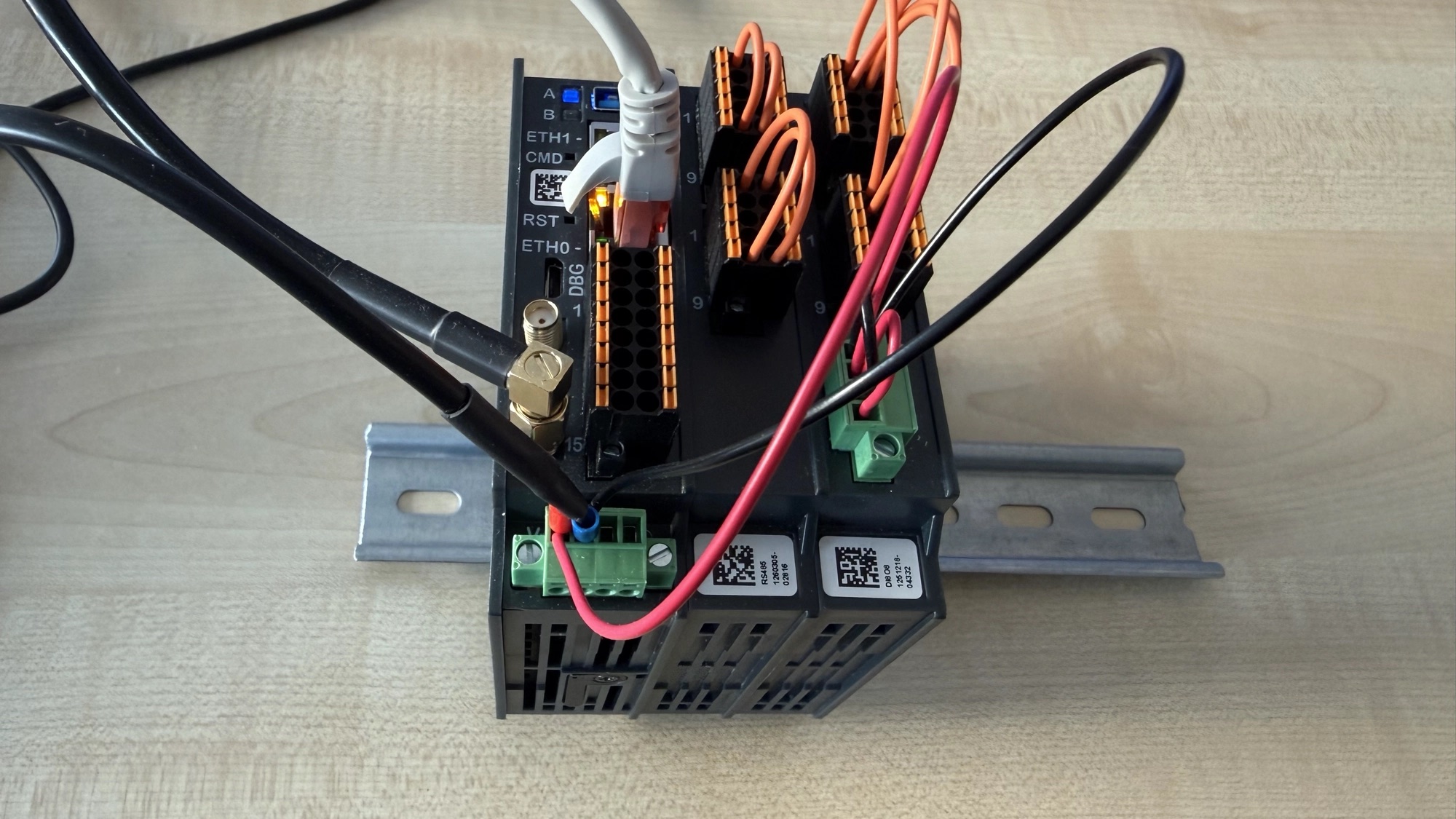
This is the first part of a series about adding secure boot to an industrial IoT gateway. Not because anyone asked for it, but because boxes like this go into the field, run for years, nobody watches them closely — and anyone with physical access and a USB cable could put whatever they liked on the eMMC and the device would boot it without complaint.
By the end of the series the board will only run bootloaders and kernels signed with my own keys, and I will have done every irreversible step deliberately rather than by accident.
This post is the part everyone skips and then regrets: exactly what hardware this is, and how to confirm that yours is the same, because the variant you have decides what you build. Getting that wrong is what stopped my board booting in part 7.
What you need to follow along
| Board | CompuLab IOT-DIN-IMX8PLUS industrial DIN-rail gateway |
| Cable | micro-USB for the DBG console, and a second for OTG |
| Host | Linux or macOS. macOS has a specific problem — see part 7 |
| A spare unit | Not one that is deployed. One step in this series is permanent |
That last row is not a disclaimer. Most of what follows is completely reversible, but right at the end there is a fuse burn that cannot be undone, and the whole point of doing it on a unit with nothing depending on it is to be able to make every mistake first.
The board
| Item | Value |
|---|---|
| Product | CompuLab IOT-DIN-IMX8PLUS, industrial DIN-rail IoT gateway |
| SoC | NXP i.MX8M Plus — 4× Cortex-A53, 1× Cortex-M7, 2.3 TOPS NPU |
| SoM | CompuLab UCM-iMX8M-Plus, up to 8 GB LPDDR4 and 128 GB eMMC |
| Machine name | iotdin-imx8p |
| DRAM variants | d2d4 and d1d8 — different LPDDR4 sizes and timings |
| Console | /dev/ttymxc1 @ 115200 8N1, on the micro-USB labelled DBG |
| Factory OS | CompuLab Debian, default user compulab |
The device tree declares itself as:
compulab,iotdin-imx8p
compulab,iot-gate-imx8plus
compulab,ucm-imx8m-plus-som
fsl,imx8mp
That inheritance chain matters later — a lot of NXP and CompuLab documentation is written
for the iot-gate-imx8plus or for the bare i.MX8M Plus EVK, and it mostly applies, right up
until it doesn't.
Confirm what you have before you build anything
Do not take the variant from the order code. Boot the factory image, get on the DBG console, and ask the board.
Memory — this is the one that bites
free -h
# or, more precisely:
cat /proc/meminfo | head -1
My unit reports 3.5 GiB usable, which is a 4 GB SoM, which means the d2d4
build. The 8 GB SKU is d1d8. There is no autodetect: you pick this at build time, and
picking wrong means the SPL fails LPDDR4 training and the board stops before U-Boot with no
useful error. From U-Boot itself:
u-boot=> bdinfo
and read the DRAM bank size. Two independent readings agreeing is worth the thirty seconds.
Storage
lsblk
NAME         MAJ:MIN RM  SIZE RO TYPE MOUNTPOINTS
mmcblk2      179:0    0 29.2G  0 disk
|-mmcblk2p1  179:1    0  118M  0 part
`-mmcblk2p2  179:2    0 29.1G  0 part /
mmcblk2boot0 179:32   0    4M  1 disk
mmcblk2boot1 179:64   0    4M  1 disk
A 32 GB eMMC (29.2 GiB usable), and this is the layout secure boot cares about:
-
mmcblk2p1— 118 MB, the kernel and device tree. -
mmcblk2p2— 29.1 GiB ext4 rootfs, mounted read-only with a forced fsck. Confirm from the kernel command line:cat /proc/cmdlineconsole=ttymxc1,115200 root=/dev/mmcblk2p2 rootwait ro fsck.mode=force ... -
mmcblk2boot0/mmcblk2boot1— 4 MB each, the eMMC hardware boot partitions. Separate block devices from the user area, read-only by default viaforce_ro. This is whereimx-bootlives, and it is what the boot ROM reads. -
mmcblk2rpmb— 4 MB of Replay Protected Memory Block, an authenticated area for things like rollback counters. Unused here. You cannotddit without a key. Worth remembering for later.
One detail that cost me time further into the project: on this board the U-Boot
environment also lives in mmcblk2boot0, at offset 0x3f0000, 16 KB, with a redundant
copy in boot1:
# /etc/fw_env.config
/dev/mmcblk2boot0	0x3f0000 0x4000
#/dev/mmcblk2boot1	0x3f0000 0x4000   # the redundant copy
That is not the SD-card convention of seeking 32 KiB into the user area, which is what most i.MX8 guides assume. If you write a Nerves or Yocto image that follows the SD convention, it will appear to work and then not find its environment.
Do not assume the device is mmcblk2. On another board it could be mmcblk0. Identify
it properly: it is the disk with RM=0 (non-removable), it is the one backing /
(findmnt /), and it is the one with companion bootN devices.
The two USB ports, before you need them
   [DBG]  micro-USB → serial console, /dev/ttymxc1 @ 115200 8N1
   [OTG]  micro-USB → USB gadget: SDP recovery, ums, fastboot
They look identical. Label your cables now, while the board still boots. In part 7 I lost
most of a day to ums succeeding on a board whose OTG cable was not plugged in — the board
reports success, the host sees nothing, and neither end reports an error.
Stock software
uname -a
cat /etc/os-release
Mine shipped kernel 6.6.52 on Debian 12 bookworm — worth noting because CompuLab's own Yocto recipe pins 6.6.23. The running factory image and the published build sources are not the same version, and if you are trying to reproduce factory behaviour exactly, that discrepancy will confuse you.
What is actually on the board
Useful context, and most of it is on I²C:
| Peripheral | Where |
|---|---|
| PMIC | PCA9450 @ i2c1 0x25 |
| RTC | AB1805 @ i2c2 0x69 |
| TPM 2.0 | Infineon SLB9673 @ i2c3 0x2e |
| Board ID EEPROM | Atmel 24c08 @ i2c3 0x50 |
| System GPIO expander | PCA9555 @ i2c3 0x20 — LEDs, modem reset, USB resets |
| LTE modem | Quectel EG25-G(D), USB 2c7c:0125, QMI via /dev/cdc-wdm0 |
| DIO module | IFM-DI8O8, PCA9555 @ i2c5 0x20–0x23, up to 4 stacked |
| ADC module | IFM-ADC, 2× TI ADS1015 @ i2c6 0x48 and 0x49 |
Confirm yours rather than trusting mine — the expansion modules are stackable and every deployment differs:
ls /sys/bus/i2c/devices/
i2cdetect -y -r 2        # check the bus number first, see the warning below
/dev/i2c-Ndoes not match the device-tree&i2cNlabel. The kernel numbers adapters in probe order.&i2c5in the DTS came up asi2c-4on my unit. Resolve buses by their MMIO address, and in application code pin by DT alias, never by the bare integer — it can shift when you build your own kernel.
The TPM is not secure boot, and this series is not about it
The board has a real Infineon SLB9673 TPM 2.0 on I²C, and the kernel binds it with no extra
work — /dev/tpm0 is simply there:
ls -l /dev/tpm*
dmesg | grep -i tpm
It is an optional fit on this product line, so yours may not have it. Mine does, and I stopped and thought about it properly rather than filing it away, because it is easy to assume it makes secure boot unnecessary. It does not.
- Secure boot is the active gatekeeper at power-on. The boot ROM — code burned into silicon that nobody can change — checks a signature before running anything. It is binary: either the code is signed by a key the chip trusts, or it is not. It records nothing and remembers nothing between reboots.
- A TPM is a passive witness. It holds a secret in a way that even someone with root, or with the eMMC desoldered on a bench, cannot extract; and it keeps a measured record of what ran during boot, so software can later ask "did this device boot the way I expect?"
The TPM does not check anything by itself. Secure boot does not remember anything. They are complementary, in that order — secure boot first, TPM as a layer on top. Mixing both projects together would make each harder to reason about, so the TPM work is deliberately a separate one: storing a device's cloud identity private key where it cannot be extracted even by somebody holding the box.
Why a separate unit, seriously
I have exactly one spare: no expansion modules doing anything real, nothing deployed, nothing depending on it.
Most of this series is reversible. You can generate keys, sign images, flash them, and watch the chip tell you honestly whether a signature verified — all while the device remains "open" and boots regardless. That is a genuinely safe place to learn, and I spent weeks there.
But one step, right at the end, burns a fuse. After it, unsigned code will not run on that board, ever, and there is no walking it back. The right way to approach that is to have already made every other mistake on a board where mistakes cost nothing.
Next: the cryptography underneath HABv4 — what the key tree actually is, and why there are several keys rather than one.