The STM32MP157F-DK2 display stack, and the Vivante GPU I did not need
Between an Elixir process and a lit pixel on the DK2 there is an LTDC, a MIPI DSI host, an OTM8009A panel and a Goodix touch controller. I spent a day preparing to enable the Vivante GC NanoUltra, then read scenic_driver_local's source and found it renders in software to /dev/fb0.
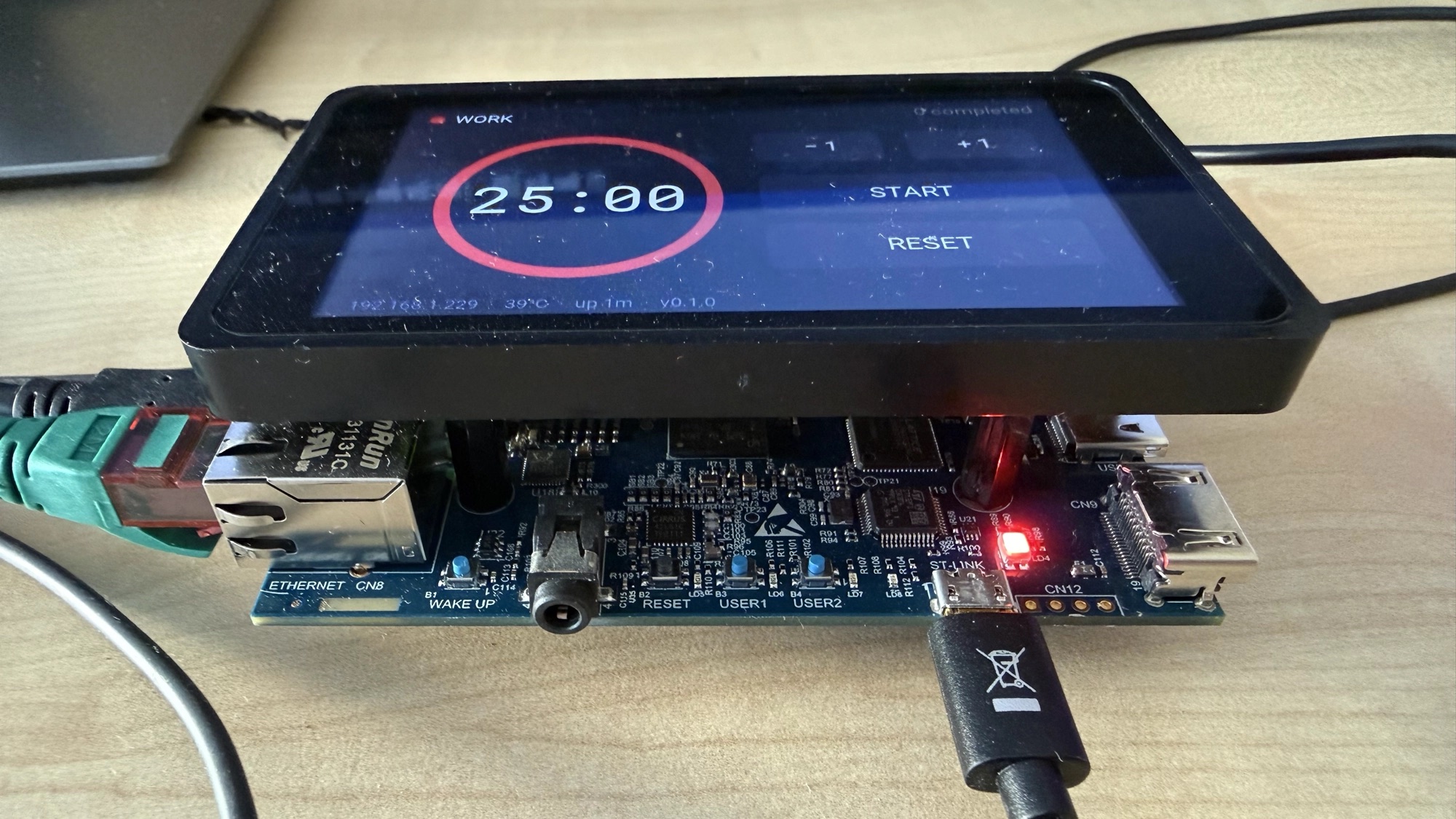
The DK2 has a 4" touchscreen bolted to the front of it. Mine had never displayed anything.
Four releases of my Nerves system for this board, and the display line in the README said the same thing every time: "Kernel driver enabled. Needs Scenic/Surface config." Which is a polite way of writing "I turned on the driver and moved on." The kernel knew about the panel. The kernel knew about the touch controller. Nothing had ever asked either of them to do anything.
This series is about fixing that. This post is about what is actually between an Elixir process and a lit pixel on this board — and about the day I spent preparing to enable a GPU I turned out not to need.
What is actually in the box
Start from the silicon and work up.
The STM32MP157F has an LTDC — an LCD-TFT display controller — feeding a MIPI DSI host. The DK2 wires that to an Orisetech OTM8009A panel: 480x800, portrait, with its own backlight driven over DCS commands rather than a separate PWM line. Bolted to the same assembly is a Goodix capacitive touch controller, hanging off I2C.
There is also a GPU. The MP157 carries a Vivante GC NanoUltra — a small 3D core, OpenGL ES 2.0. Remember it, because it is about to become the most important thing in this post and then stop mattering entirely.
In Linux, all of that is four config symbols:
CONFIG_DRM=y
CONFIG_DRM_STM=y
CONFIG_DRM_STM_DSI=y
CONFIG_DRM_PANEL_ORISETECH_OTM8009A=y
CONFIG_TOUCHSCREEN_GOODIX=y
Five, counting touch. They had been in my kernel fragment since v1.0.0, labelled
# --- GPU/Display (for Phase 4) ---, and Phase 4 kept not arriving.
The plan I did not execute
Here is the reasoning I started with, which is wrong, and which I suspect a lot of people would arrive at independently.
Scenic is Elixir's native UI framework. Scenic renders through OpenGL. The MP157 has a GPU. Therefore: enable the GPU, and Scenic will work.
Enabling that GPU is not a small job. Mainline etnaviv support for the GC NanoUltra
is thin. The practical route on STM32MP1 is ST's proprietary blob, packaged in
Buildroot as gcnano-binaries, which brings a kernel module and a userspace EGL/GLES
implementation. On top of that you need mesa3d for the GBM layer, libdrm, and then
you get to find out whether the combination actually works on your kernel version.
I had the Buildroot symbols picked out. I was ready to spend a weekend on it.
Then I went and read the driver's source instead of its documentation, and the whole plan evaporated.
Scenic does not need a GPU
scenic_driver_local picks a rendering backend from an environment variable,
SCENIC_LOCAL_TARGET. The current version offers five values. Two of them are
built on cairo:
cairo-gtk    desktop  — a window, via GTK3
cairo-fb     embedded — straight into the framebuffer
And three of them — glfw, bcm, drm, the OpenGL ones — are deprecated:
SCENIC_LOCAL_TARGET=glfw is deprecated. Please use `SCENIC_LOCAL_TARGET=cairo-gtk`
SCENIC_LOCAL_TARGET=bcm  is deprecated. Please use `SCENIC_LOCAL_TARGET=cairo-fb`
SCENIC_LOCAL_TARGET=drm  is deprecated. Please use `SCENIC_LOCAL_TARGET=cairo-fb`
cairo-fb links two libraries:
LDFLAGS += `pkg-config --static --libs freetype2 cairo`
That is the whole dependency list. Freetype and cairo. No mesa, no EGL, no GBM, no
libdrm, no vendor blob. It renders in software and mmaps the result into
/dev/fb0:
ioctl(g_cairo_fb.fd, FBIOGET_VSCREENINFO, &g_cairo_fb.var);
...
mmap(NULL, fb_size, PROT_WRITE | PROT_READ, MAP_SHARED, g_cairo_fb.fd, 0);
Two ioctls and an mmap. That is the entire graphics stack.
The GPU is still sitting there on the die, unused. For a dashboard, a status display, or a control panel with some buttons on it, two Cortex-A7s at 800 MHz pushing 480x800 pixels in software is not a compromise — it is more headroom than the application needs. A GPU would buy me nothing except a much longer build.
So the base system needed four small userspace libraries:
BR2_PACKAGE_CAIRO=y
BR2_PACKAGE_CAIRO_PNG=y
BR2_PACKAGE_FREETYPE=y
BR2_PACKAGE_LIBPNG=y
BR2_PACKAGE_PIXMAN=y
That went out as v1.4.0. Adds a couple of megabytes to the rootfs. No kernel change, no GPU driver, no blob.
The stack, corrected
Elixir scene
     │
scenic_driver_local  ──  SCENIC_LOCAL_TARGET=cairo-fb
     │
cairo + freetype     ──  software rendering
     │
/dev/fb0             ──  FBIOGET_VSCREENINFO + mmap
     │
DRM_STM → DSI → OTM8009A panel
Touch comes up the other side, independently: the Goodix driver registers an input
device, and the driver reads /dev/input/event* directly through evdev. No X, no
Wayland, no compositor, no window manager. There is nothing between the BEAM and
the panel except cairo and a memory map.
That is the part I find genuinely pleasing about this. An embedded Linux UI stack usually means a display server and a toolkit and a session manager and a stack of things that exist to arbitrate between applications. There is one application here. It does not need arbitrating. It needs a buffer.
"So are you using the framebuffer?"
This is the first question every hardware person asks me, so here is the answer without jargon.
My Elixir code never touches a pixel. It builds a description of the screen —
circle here, this radius, this colour; text there, this font, this size — which is
just data in memory. Scenic turns that description into a compact list of drawing
commands and pipes it over an ordinary Unix pipe to a tiny C program running as a
separate OS process. That C program is the only thing in the whole stack that knows
what a pixel is. It uses cairo to paint the commands into a block of memory, then
opens /dev/fb0, asks the kernel for the panel geometry, mmap()s the framebuffer
into its own address space, and copies the finished image straight in. 480x800,
16 bits per pixel, RGB565. The LTDC scans it out over DSI to the panel like any
other framebuffer content.
So: yes. Literally the framebuffer.
But there is a better answer if someone asks what cairo draws into, because it is not the framebuffer:
p_ctx->surface = cairo_image_surface_create(CAIRO_FORMAT_ARGB32, ...)
Cairo draws into ordinary RAM as 32-bit ARGB and never opens /dev/fb0 at all. Once
per frame, a separate function does the hardware half:
- Flush the surface, grab the raw pixels with
cairo_image_surface_get_data() - Convert ARGB32 into the panel's format. It switches on
var.bits_per_pixel— mine is 16, so each pixel is packed into RGB565. It also readsvar.red.offset/green.offset/blue.offsetto spot BGR ordering and swap if the panel wants it. mmap()the framebuffer,memcpyrow by row (respecting the stride, which is not always the visible width), thenmunmap()
Two buffers and one format conversion between a drawing command and a lit pixel: cairo's ARGB32 surface, a converted RGB565 buffer, then the framebuffer.
Two things in that code I did not expect and am glad I read.
It mmaps and munmaps every single frame. A syscall pair per redraw. Irrelevant at a clock's refresh rate; the first place I would look if I ever needed real frame rates.
It clips rather than scales:
xc = (pic_xs > scr_xs) ? scr_xs : pic_xs;
If the picture is wider than the screen, the extra columns are silently dropped. No error, no warning. That one line explains a rotation bug that cost me a while later — but that is a different post.
Touch comes back the other way through the standard input layer — Goodix on I2C,
kernel driver, events on /dev/input/event*, and the same C program read()s them
and passes coordinates back up the pipe.
The part worth emphasising is how much is not there. No X11, no Wayland, no compositor, no window manager, no desktop environment, no GPU driver, no OpenGL, no Mesa. About two megabytes of userspace, and everything above it is supervised BEAM processes. If the thing drawing the screen crashes, it restarts, and the display comes back on its own.
Where the C program comes from (not Buildroot)
A follow-up question I did not anticipate, and the answer matters.
That little C program is not part of my Nerves system. Its source ships inside
the scenic_driver_local hex package as c_src/*.c. During mix firmware,
elixir_make compiles it with the Nerves cross-compiler and it rides along inside
the OTP release:
lib/scenic_driver_local-0.12.0-rc.0/priv/scenic_driver_local
ELF 32-bit LSB executable, ARM, EABI5, dynamically linked
Buildroot supplies the libraries it links against — that is what
BR2_PACKAGE_CAIRO=y produced — and nothing else.
Two build systems meeting in the middle: Buildroot builds the OS and it becomes the
read-only squashfs; Mix cross-compiles the application separately against Buildroot's
staging sysroot and drops it on top; the dynamic linker joins them at runtime when
the binary asks for libcairo.so.2.
Which gives a rule I now keep in my head:
| Change | How it ships |
|---|---|
| Scenic version, my code, any dep with C in it | OTA |
| cairo, freetype, kernel, U-Boot, Erlang/OTP | New system release, and a real burn |
If it lives in deps/, it goes out over the air. If it comes from
nerves_defconfig, it does not.
Where this went wrong anyway
I want to be honest about the mistake in the middle of this, because the lesson is more useful than the conclusion.
Everything above is true of current scenic_driver_local. I read it on GitHub's
default branch — the README documenting cairo-fb, the Makefile with the cairo
targets, the cairo_fb.c source with the mmap in it. I wrote v1.4.0 against it.
I put a line in my README saying:
scenic_driver_local v0.11+ uses cairo-fb for software rendering
And then I pinned {:scenic_driver_local, "~> 0.11"} in a project, built it, and
watched pkg-config go looking for glfw3 and glew.
Released 0.11.0 has no cairo backend. None. Its c_src/device/ directory contains
exactly three files:
bcm.c drm.c glfw.c
The cairo backends first appear in 0.12.0-rc.0. The default branch I had been reading was describing unreleased work, and I had assumed — without ever checking — that it described the package Hex would hand me.
The failure mode is genuinely unpleasant if you follow my README. Pin ~> 0.11 on
a Nerves target and you get the drm backend, which links:
-lGLESv2 -lEGL -lm -lvchostif -ldrm -lgbm
Mesa, EGL, GBM — and -lvchostif, which is a Broadcom library. On an STM32MP1. You
get a link failure that looks exactly like your base system is missing packages,
when in fact your base system is correct and your dependency constraint is wrong.
You would go and add mesa3d to your Buildroot config, which is precisely the
weekend I was trying to avoid, and it still would not link, because there is no
vchostif outside a Raspberry Pi.
So: pin ~> 0.12.0-rc.0, both scenic and scenic_driver_local.
I am not thrilled about shipping against a release candidate that has sat unreleased since mid-2024. But the alternative is not a stable version that works. The alternative is a stable version that cannot render on this board at all without a GPU enablement project. That is not a close call.
The consolation is that v1.4.0's packages were right all along. Cairo, freetype,
libpng, pixman is exactly and only what cairo-fb links. I got the system correct
and the documentation wrong, and documentation does not affect the built image. No
rebuild. Just a README that needs an apology in it.
The lesson: GitHub's default branch is not the released package. If a library's
behaviour matters to a decision you are about to spend a weekend on, read the
version you will actually depend on — mix deps.get it and open the source, or pull
the tarball off Hex and look inside. The README on the front page is describing
whatever the maintainer is working on now.
One good thing
While I was in there, I found something worth knowing. You do not have to set
SCENIC_LOCAL_TARGET at all:
case target() do
  n when n in [:dev, :host] -> System.put_env("SCENIC_LOCAL_TARGET", "cairo-gtk")
  _                         -> System.put_env("SCENIC_LOCAL_TARGET", "cairo-fb")
end
A Mix compiler in scenic_driver_local sets it for you. Host gets a GTK window,
every Nerves target gets the framebuffer. Which means an application written
against this system needs no board-specific graphics configuration — the same
code runs in a window on my Mac and on the panel on my desk, and nothing in the
project says which.
That is going to matter a lot in the next post, because it turns "tweak a colour" from a firmware build, a flash and a reboot into a two-second window refresh.
Next: building the UI. Scenic scenes, why the thing counting the seconds should know nothing about the thing drawing them, and how to test a 25-minute timer without waiting 25 minutes.