Scenic on Nerves: scenes, graphs, drivers, and four things that bit me
Scenes, graphs, components and drivers on an STM32MP157F-DK2 — then the four gotchas that compile cleanly and fail on the device: the required assets module, the child spec that is a plain list, the missing input: style that made every button inert, and text_align: :center not working.
Part 4 of a series on driving the STM32MP157F-DK2's touchscreen from Elixir. This one stands alone — if you are putting Scenic on any Nerves board, the traps at the end are the reason I wrote it.
The Scenic documentation is good. What it does not have is a list of the things that compile perfectly, pass your tests, and then fail on the device. I hit four of those building a touchscreen UI for my STM32MP157F-DK2, and every one cost me more time than the feature it was part of.
So: a short tutorial, then the traps.
The mental model
Scenic has exactly one idea worth internalising: a graph is data.
Graph.build(font: :roboto, font_size: 24)
|> rect({800, 480}, fill: {0x16, 0x16, 0x1A})
|> circle(150, stroke: {18, {0xE5, 0x4B, 0x4B}}, translate: {230, 250})
|> text("25:00", font_size: 80, fill: :white, translate: {230, 282})
That is not drawing anything. It is building a map of primitives with their transforms and styles. Nothing touches a pixel until a driver takes that structure, turns it into a list of draw commands, and hands it to something that can rasterise.
This has a consequence people undersell: your layout is testable without a screen.
test "the progress arc tracks the remaining fraction" do
  graph = Scene.build_graph(state(%{remaining_ms: div(@work_ms, 4)}), vitals())
  [arc] = Graph.get(graph, :progress_arc)
  {_radius, angle} = arc.data
  assert_in_delta angle, :math.pi() / 2, 0.0001
end
No display, no driver, no board. On an embedded project where the feedback loop is normally "build firmware, flash, look", that is worth a great deal.
Scenes
A scene is a GenServer that owns a graph.
defmodule MyApp.Scene.Home do
  use Scenic.Scene
  alias Scenic.Graph
  import Scenic.Primitives

  @impl true
  def init(scene, _param, _opts) do
    graph =
      Graph.build()
      |> text("Hello", translate: {100, 100})

    {:ok, push_graph(scene, graph)}
  end
end
push_graph/2 is what makes it visible. Because it is a GenServer, handle_info/2
works normally — which is how my clock updates: a separate timer process broadcasts
its state, the scene receives it, rebuilds, pushes.
Keep the graph-building in a pure function:
def build_graph(timer_state, vitals) do
  # no process calls, no Application.get_env, no I/O
end
Everything good downstream comes from this: the tests above, and the ability to render any UI state to an image without hardware.
Components and input
A component is a scene that can be embedded in another scene's graph and send events to its parent.
defmodule MyApp.Component.BigButton do
  use Scenic.Component, has_children: false

  @impl true
  def validate({label, {w, h}} = data) when is_binary(label), do: {:ok, data}
  def validate(data), do: {:error, "expected {label, {w, h}}, got #{inspect(data)}"}

  @impl true
  def init(scene, {label, {w, h}}, opts) do
    graph =
      Graph.build()
      |> rrect({w, h, 12}, fill: {0x33, 0x33, 0x38}, id: :bg, input: :cursor_button)
      |> text(label, font_size: 30, fill: :white, translate: {w / 2, h / 2 + 10})

    {:ok, scene |> assign(id: opts[:id]) |> push_graph(graph)}
  end

  @impl true
  def handle_input({:cursor_button, {:btn_left, 0, _, _}}, :bg, scene) do
    send_parent_event(scene, {:click, scene.assigns.id})
    {:noreply, scene}
  end

  def handle_input(_input, _id, scene), do: {:noreply, scene}
end
The parent then handles {:click, id} in handle_event/3. Note input: :cursor_button on the rrect — hold that thought, it is Trap 3.
Drivers
The driver turns graphs into pixels. On Nerves you want scenic_driver_local, and the
happy surprise is that it configures itself:
case target() do
  n when n in [:dev, :host] -> System.put_env("SCENIC_LOCAL_TARGET", "cairo-gtk")
  _                         -> System.put_env("SCENIC_LOCAL_TARGET", "cairo-fb")
end
A window on your laptop, the framebuffer on the device, same application code. Your
system needs BR2_PACKAGE_CAIRO=y and freetype; that is the entire graphics
dependency.
The four traps
Everything above is in the docs. This part is not.
Trap 1: Scenic 0.12 requires an assets module
Render any text without one and you get:
** (RuntimeError) No assets module is configured.
    (scenic) lib/scenic/primitive/style/font.ex:56:
      Scenic.Primitive.Style.Font.validate/1
Even using only the bundled Roboto. There is no fonts-only fallback path.
defmodule MyApp.Assets do
  use Scenic.Assets.Static, otp_app: :my_app
end
config :scenic, :assets, module: MyApp.Assets
Mine ships no images at all. It exists purely to satisfy font validation.
Trap 2: the supervisor child spec is a plain list
{Scenic, [viewport_config()]}           # correct
{Scenic, [viewports: [viewport_config]]} # compiles, then dies at boot
The keyword form is the natural guess and it is wrong. Scenic.child_spec/1 passes
its argument straight through:
def start_link(vps) when is_list(vps) do
  ...
  Enum.each(vps, &Scenic.ViewPort.start(&1))
So the keyword version hands {:viewports, [...]} — a tuple — to a function
expecting a config, and you get Protocol.UndefinedError: protocol Enumerable not implemented for Tuple at startup.
Trap 3: a primitive without input: is not clickable. At all.
This is the expensive one. My buttons looked perfect and nothing happened when you pressed them. Not intermittently — never, not once.
The cause is one missing style. Scenic only hit-tests primitives that declare what input they want:
# deps/scenic/lib/scenic/view_port.ex
defp comp_input_prim(input, _uid, %Primitive{styles: %{input: input_types}} = p, _, tx) do
  [{module, data, local_tx, self(), input_types, id} | input]
end

# primitives that don't have input set are skipped
defp comp_input_prim(input, _uid, _primitive, _, _tx), do: input
That comment is the whole bug. My rrect had an id: but no input:, so it was
never added to the hit-test list, handle_input/3 was never called, and no event was
ever emitted.
|> rrect({w, h, 12}, fill: fill, id: :bg, input: :cursor_button)
#                                          ^^^^^^^^^^^^^^^^^^^^
Scenic's own button does exactly this. I had used request_input(scene, [:cursor_button]) instead — which is a different mechanism entirely, handing every
cursor event to every component and making you disambiguate by id. The :input
style does positional routing, which is what you actually want.
Why 51 tests and three code reviews missed it: nothing in my suite ever started a
ViewPort, so the whole input path was untested by construction. The fix is cheaper
than it sounds — a ViewPort with drivers: [] starts headless:
{:ok, vp} = Scenic.ViewPort.start(
  name: :test_vp, size: {800, 480}, default_scene: MyApp.Scene.Home, drivers: []
)

ViewPort.input(vp, {:cursor_button, {:btn_left, 1, [], {595, 244}}})
ViewPort.input(vp, {:cursor_button, {:btn_left, 0, [], {595, 244}}})

assert MyApp.Timer.state().status == :running
No display needed. Fifteen lines that would have caught this on day one. If you write one integration test in a Scenic app, write this one.
Trap 4: text_align: :center did not work, and the fix is arithmetic
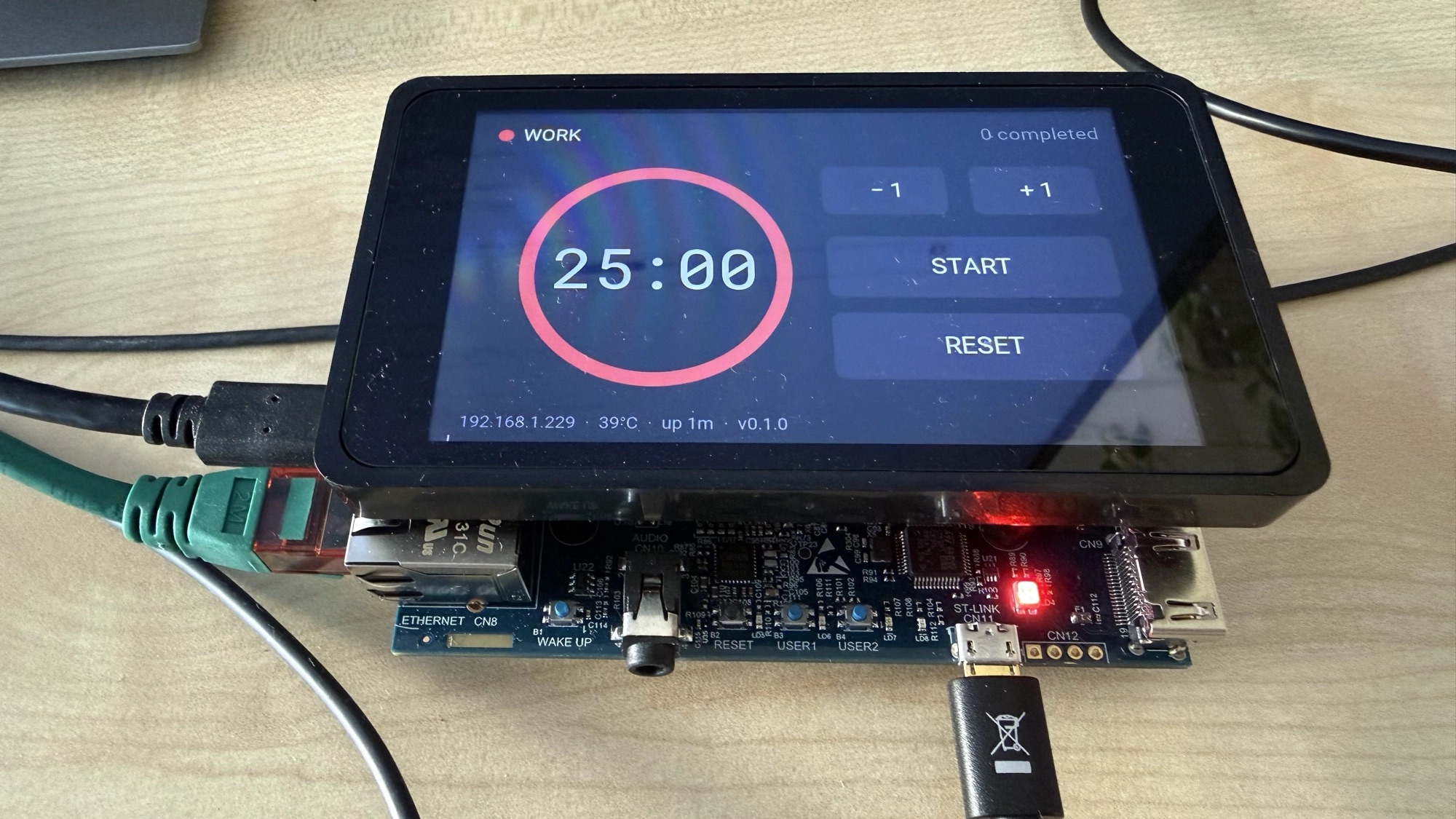
My countdown drifted left and right as the digits changed. Roboto Mono is
monospaced, so "25:00" and "09:59" are identical widths — it should have been
impossible.
First attempt: split MM:SS into five text primitives, one per character, each
text_align: :center in its own fixed 48px cell. Structurally immune to jitter,
in theory.
Second attempt: the colon looked lost in a full-width digit cell, so I narrowed its cell to 24px.
That made it visibly worse, and a photo of the panel showed why: big gap after the
5, colon jammed into the first 0. That is not a centring problem. That is the
signature of glyphs being drawn left-aligned from their given x. text_align: :center was simply not taking effect, and narrowing the cell had pulled the colon's
48px advance into the next digit's space.
Lesson one: photograph the device. I had spent an hour reasoning about font metrics from source when one picture settled it in seconds.
Lesson two: if a renderer will not centre for you, centre it yourself. Stop relying on the style and place each glyph's left edge:
@digit_cell 48  # Roboto Mono advance at font_size 80 = 0.6 * 80

defp char_offset(index) do
  (index - 2) * @digit_cell - div(@digit_cell, 2)
end
Five glyphs at a uniform 48px pitch, the whole run shifted left by half a cell:
cx-120, cx-72, cx-24, cx+24, cx+72
The block spans cx-120 … cx+120, so it is centred. The colon's cell is
cx-24 … cx+24, so its ink lands on cx. And critically, text_align: :left is now
set explicitly, with a comment saying why — because it looks like a mistake, and
the next person (me, in six months) would "fix" it back to :center.
The test that guards it is not the position test. It is this:
test "character positions are identical regardless of the digits" do
  assert char_translates("25:00") == char_translates("09:59")
end
Plus one asserting every character carries text_align: :left. That is the
regression guard for the fix itself.
What I would tell myself at the start
Write the headless ViewPort test first. drivers: [], synthetic input, assert
the state changed. It takes fifteen minutes and it is the only thing that tests the
half of Scenic that matters on a touchscreen.
Render your UI to an image early. A graph is data, so you can walk it and emit SVG with no display, driver or board. Mine caught a countdown that overflowed its ring and a button that did nothing — neither visible from reading code.
Photograph the panel when something looks wrong. Embedded debugging pulls you toward source archaeology. A photo is evidence, and it is faster.
When a thing that should work does not, check whether it is wired up at all before assuming you are using it wrong. Three of these four traps were not misconfiguration — they were a missing declaration that made the feature silently inert.
The code is in
stm32mp157f_dk2_displaydemo,
running on my
nerves_system_stm32mp157f_dk2.